
-
Ensure the latest DVR+O SCI is installed by following the Software Install instructions.
-
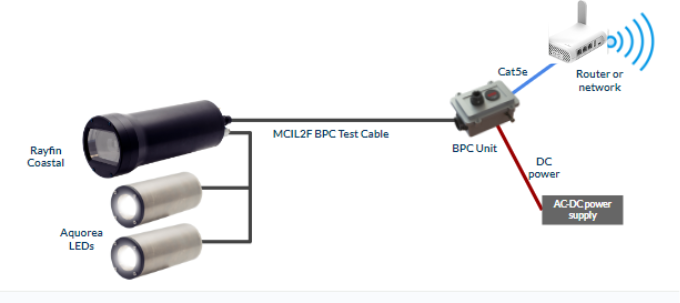
Connect the AC-DC power supply (24V) to the BPC Unit
-
Connect the IP67 Ethernet Cable to the BPC Unit
-
Connect the other end of the Ethernet Cable to an available port on the Ethernet router
-
Connect the MCIL2F BPC Test Cable to the BPC Unit and the back of the Rayfin BPC
-
Connect the LEDs and/or Lasers (if using) to the Rayfin with the MCIL5M cables
-
Turn on the BPC Unit. Monitor the voltage; it should be >= 23.5VDC
-
The Rayfin will take 30 seconds to boot. It may take a few extra seconds for the router to register the camera
-
Follow the Quick Start Guide - Rayfin Coastal, Single Channel Inspection instructions from Rayfin Control Software to connect to the camera.
|
Required Components |
|---|
|
SubC Rayfin Coastal |
|
SubC BPC Unit |
|
MCIL2F BPC Test Cable |
|
USB stick with DVR-O SCI and QC docs |
|
AC-DC power supply w/ Buccaneer connector |
|
IP67-rated Ethernet cable |
|
Router or Ethernet network |
|
Windows PC |
|
Optional LEDs, lasers, and cables |