
|
|||||||||||
|---|---|---|---|---|---|---|---|---|---|---|---|
|
|||||||||||
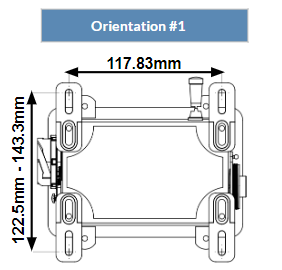
|
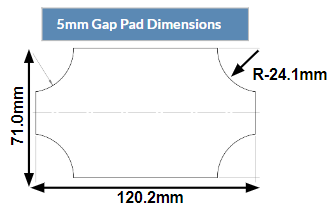
|
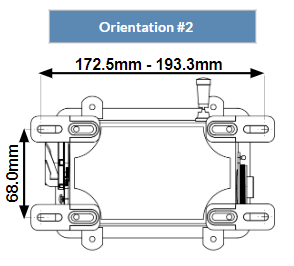
|
|||||||||
|
|||||||||||
|
|||||||||||
|
|||||||||||
|
||
|
1 |
Place the mounting feet in one of the two available orientations. |
|
|
2 |
The feet can be adjusted slightly before tightening, depending on the desired spacing. |
|
|
3 |
Tighten the provided (x4) M5x6mm socket cap screws. |
|
|
4 |
Clean the bottom of the BPC Unit with Isopropyl alcohol and a clean lint-free cloth. |
|
|
5 |
Remove the protective film on one side of the provided thermal gap pad and affix the gap pad to the bottom of the BPC Unit. Press firmly to adhere. |
|
|
6 |
Clean the surface you are mounting to with Isopropyl alcohol, firmly press the BPC Unit in place, and secure the feet with 4 bolts. |
|