In some cases, it may be necessary to manually update the Rayfin camera ROM to a version given to you by the SubC support team. (Example: To apply a hot fix or custom changes you may have requested.)
Follow these steps:
-
Download the manual ROM update file using the link provided to you by SubC Support.
-
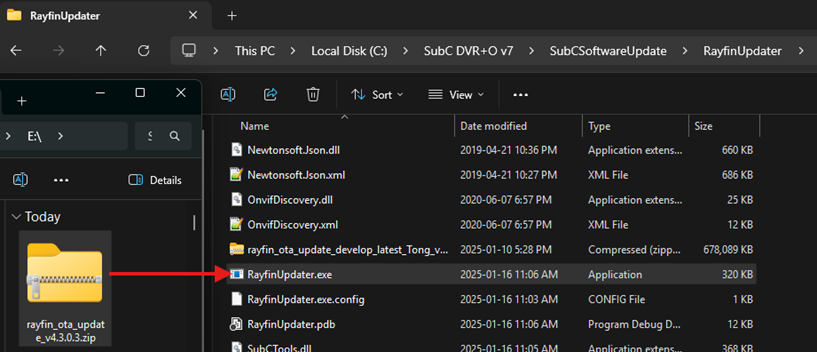
Open Windows Explorer and go to C:\SubC DVR+O v7\SubCSoftwareUpdate\RayfinUpdater
-
Drag the update ROM file onto RayfinUpdater.exe
-
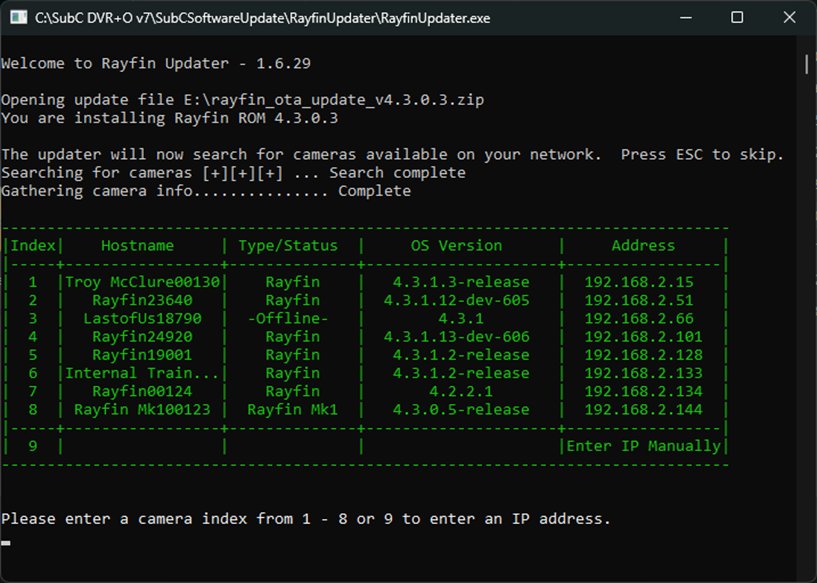
The following Rayfin Updater window will appear
-
Select your camera from the list or enter the IP manually.
-