

Menu → Blackbox Recording Settings
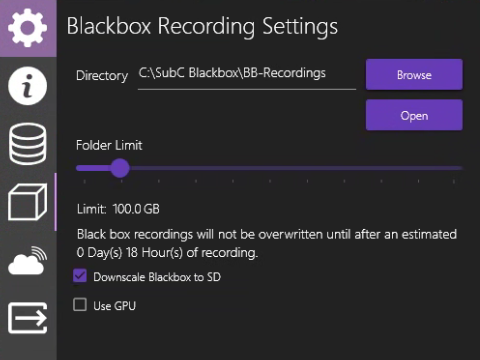
Directory: Displays the path to the selected directory for saving Blackbox recording files.
Browse: Click to select a Blackbox directory.
Open: To open the Blackbox directory in Windows File Explorer.
Folder Limit: Slide to select a folder size limit for the Blackbox directory.
Blackbox recordings will not be overwritten until after an estimated # Day(s) # Hours(s) (these #'s change based on the Folder Limit selected) of recording.
Downscale Blackbox to SD: Downscale from HD (High Definition) to SD (Standard Definition)
Use GPU: Select to utilize the system GPU (Graphic Processing Unit) rather than the system CPU (Central Processing Unit)