
The Following SubC Software Products Require a License
-
SubC Blackbox
-
SubC DVR+ / SCI
-
DVR+ SecureEdge LAN Streaming
-
SubC ReviewStudio (DVR+ Eventing companion application)
SubC DVR & Laptop Systems Include Software & License
When you purchase a SubC DVR system or SubC Rugged Toughbook laptop System with one of the above software products, the SubC Software and License will be applied to that system before it is shipped to you.
Software-Only
You can also purchase SubC Software only to install on your own system. Check the SubC Software System Requirements page to ensure your host system meets our system resources requirements.
We will provide you with a download link to the Software installation file and your choice of Dongle or Virtual License
License Options - Virtual or Dongle
Virtual License: This is a system dedicated license that is imported to a virtual license container on the SubC Software host system.
Dongle License: If you wish to be able to run the SubC product software application on multiple systems, we can provide a portable license on a USB Dongle.
Be careful not to misplace the CodeMeter License Dongle! If you need to replace the CodeMeter License Dongle, you will be required to purchase the SubC Product Software License again.

Renewing SubC Software Product License
SubC License Maintenance Period is established at the time of purchase.
During the Maintenance Period you are entitled to upgrade to new SubC Software updates that are released before the Maintenance Period End Date (MPED).
When your License reached this Maintenance Period End Date (MPED), you can continue to use the SubC Software, however if you wish to continue to have access to future SubC Software updates, you will be required to renew your License to extend the Maintenance Period.
When it's getting near your SubC Software License Maintenance End Date, the Software will display a message indicating how long before your License is due to expire.
When you see this message, you are encouraged to contact sales@subcimaging.com to get your License renewed.
You can also open SubC License app from your Windows Start menu to view your License Maintenance End Date in the Containers tab.
SubC License WIBU Error Messages
You will see this error message under the following conditions:
Example:
If you install SubC Software update that has been released after your License Maintenance Period End Date (MPED) - this will cause your SubC Software to no longer open.
If this happens, you can reinstall a version of SubC Software that was released before your License MPED or contact your SubC Account Manager to request a License Update.
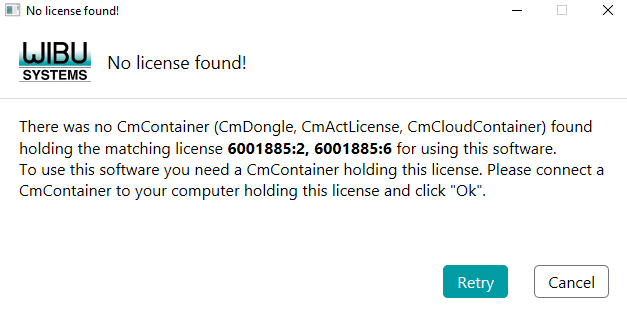
You will see “WIBU No License found!” error message under the following conditions:
-
If you launch the SubC Software application without the SubC License Dongle plugged into the USB port on the host system. Insert your SubC product CodeMeter License Dongle into the system USB port and click Retry.
-
If you do not have a Dongle License or Virtual License installed on your system
-
If you already have the SubC Software running and try to launch it again. Check your Windows task tray at the bottom of your screen to see if the SubC application is already opened or check Task Manage to see if there are still some SubC application processes that did not close properly on previous application closer.
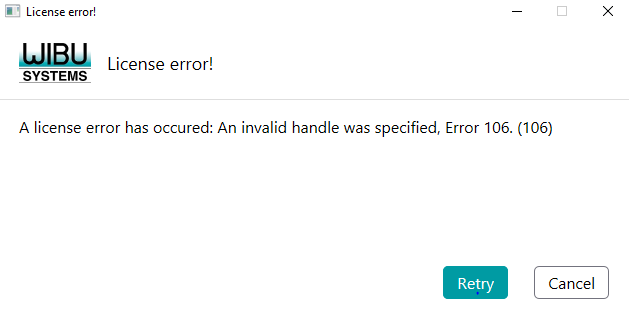
If you encounter WIBU License error! contact SubC Support Team for assistance.