
Use the Time & Locale feature to Configure the Time Zone and Configure the Date / Time on the Rayfin Camera.
Rayfin Input Feature

Menu → Time & Locale
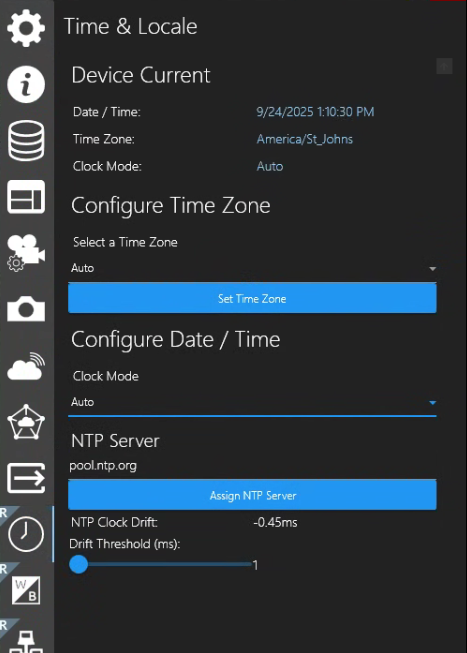
Clock Mode Auto
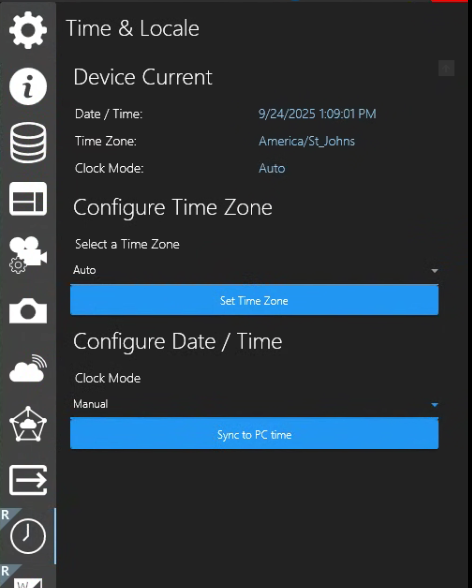
Clock Mode Manual
Device Current
-
Date / Time: Show the Rayfin camera’s current date & time
-
Time Zone: Will show the name of the TZ when selected from “Select a Time Zone” field below.
-
Clock Mode: Auto or Manual
-
Show as Auto when “Configure Date / Time → Clock Mode → Auto” and NTP Server selection option is available.
-
Shows as Manual when “Configure Date / Time → Clock Mode → Manual” and Sync to PC time option button appears.
-
Configure Time Zone
-
Auto or select your Time Zone from this drop-down field.
-
Set Time Zone - Click this button to apply the Time Zone you have selected.
Configure Data / Time
-
Clock Mode - Auto
-
NTP Server selection option is available
-
Assign NTP Server - Assign the NTP Server to Rayfin to keep track of time.
-
NTP Clock Drift - Drift in milliseconds
-
-
Clock Mode - Manual
-
Sync to PC time option button appears
-