
1. Installing Rayfin Stereo System:
Torque Requirements:
|
Stainless Steel Fasteners Torque |
|
|---|---|
|
Fastener |
Max Torque |
|
1/4”-20 Stainless Steel Fasteners |
8 N.m / 5 lbf.ft |
|
#10 Stainless Steel Fasteners |
4 N.m / 3 lbf.ft |
A. Rayfin Stereo System Mounting on ROV:
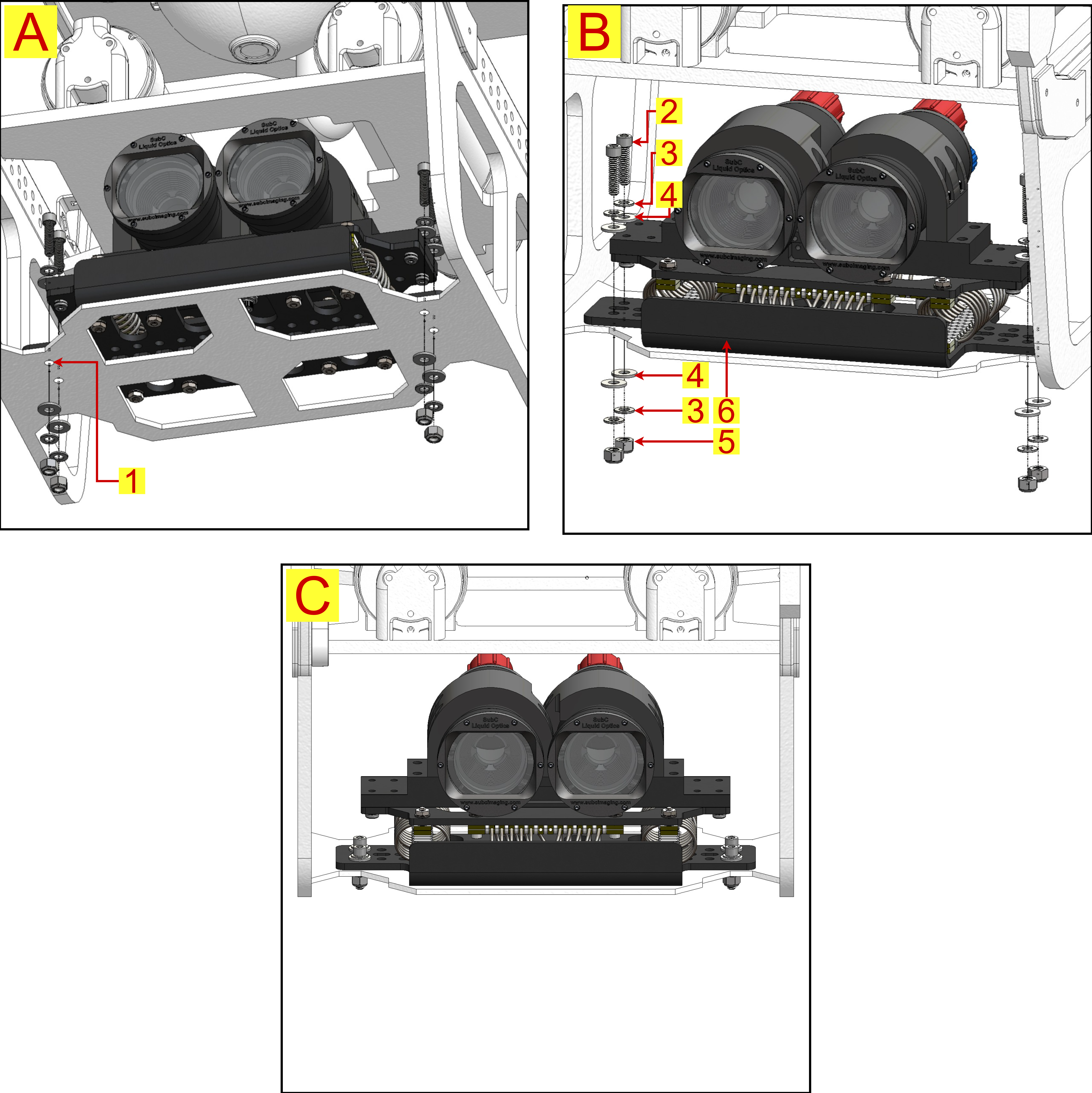
|
Fastener & Hardware List |
|
|
Item |
Description |
|
1 |
ROV Base Plate |
|
2 |
1/4”-20, 1” Long Stainless Steel screw |
|
3 |
316 Stainless Steel Washer |
|
4 |
PVC Washer |
|
5 |
1/4”-20 Hex Lock Nut |
|
6 |
Rayfin Stereo System Assembly |
Instructions:
a. Using the Rayfin Stereo System Mounting template, drill 4x 1/4” clearance holes in the ROV base plate. A 17/64” (6.8mm) drill bit provides the best fit. b. Place Rayfin Stereo System assembly (6) on the drilled ROV base plate (1). c. On the Rayfin Stereo base plate, add PVC washer (4) and stainless washer (3) as shown in Image B. d. Insert 1/4”-20 x 1” stainless screw (2) through the washers; then place PVC washer (4) and stainless washer (3) beneath the base plate per Image B. e. Fit 1/4”-20 hex lock nut (5) and tighten securely. Repeat for all screws until the Stereo System is fully fastened. f. Final assembly should match Image C. Ensure the hex nuts protruding at the bottom of the Rayfin Stereo System Assembly do not touch any component or floor to ensure proper vibration isolation. |
B. Rayfin Stereo System Camera Alignment:
|
Fastener & Hardware List |
|
|
Item |
Description |
|
1 |
Base Mount Alignment Tool Slot |
|
2 |
Alignment Tool |
|
3 |
M4 x 18mm Stainless Steel Screws |
|
4 |
M4 x 14mm Stainless Steel Screws |
|
5 |
1/4”-20, 1-1/4” Long Stainless Steel Screws |
|
6 |
1/4”-20, 1-1/2” Long Stainless Steel Screws |
Instructions:
a. Remove the Rayfin cameras and holders from the base. b. Insert the Alignment Tool (2) into the Alignment Tool slot on the base mount (1). c. Use M4 × 18 mm screws (3) in the outer holes and M4 × 14 mm screws (4) in the inner holes (see Image A). d. The assembled Alignment Tool should match Image B. e. Place Rayfin holders on base mount (1). Secure loosely with 1/4"-20, 1-1/4" screws (5) in inner holes and 1/4"-20, 1-1/2" screws (6) in outer holes (see Image C). f. Insert Rayfin cameras into holders oriented correctly and slide inward until they contact the Alignment Tool face. g. Ensure bottom inner camera screws (7) enter alignment hole (8), and cameras sit flush with the Alignment Tool (see Image D). h. Once positioned, fully tighten the 1/4"-20 screws (5) and (6) to fix the cameras (see Image E). i. Final assembly should match Image F. Always apply Loctite-242 threadlocker on mounting screws (5) and (6) to ensure screws do not come loose during operation. |
2. Cable Connections:
A. Rayfin Stereo System Wiring Diagram:
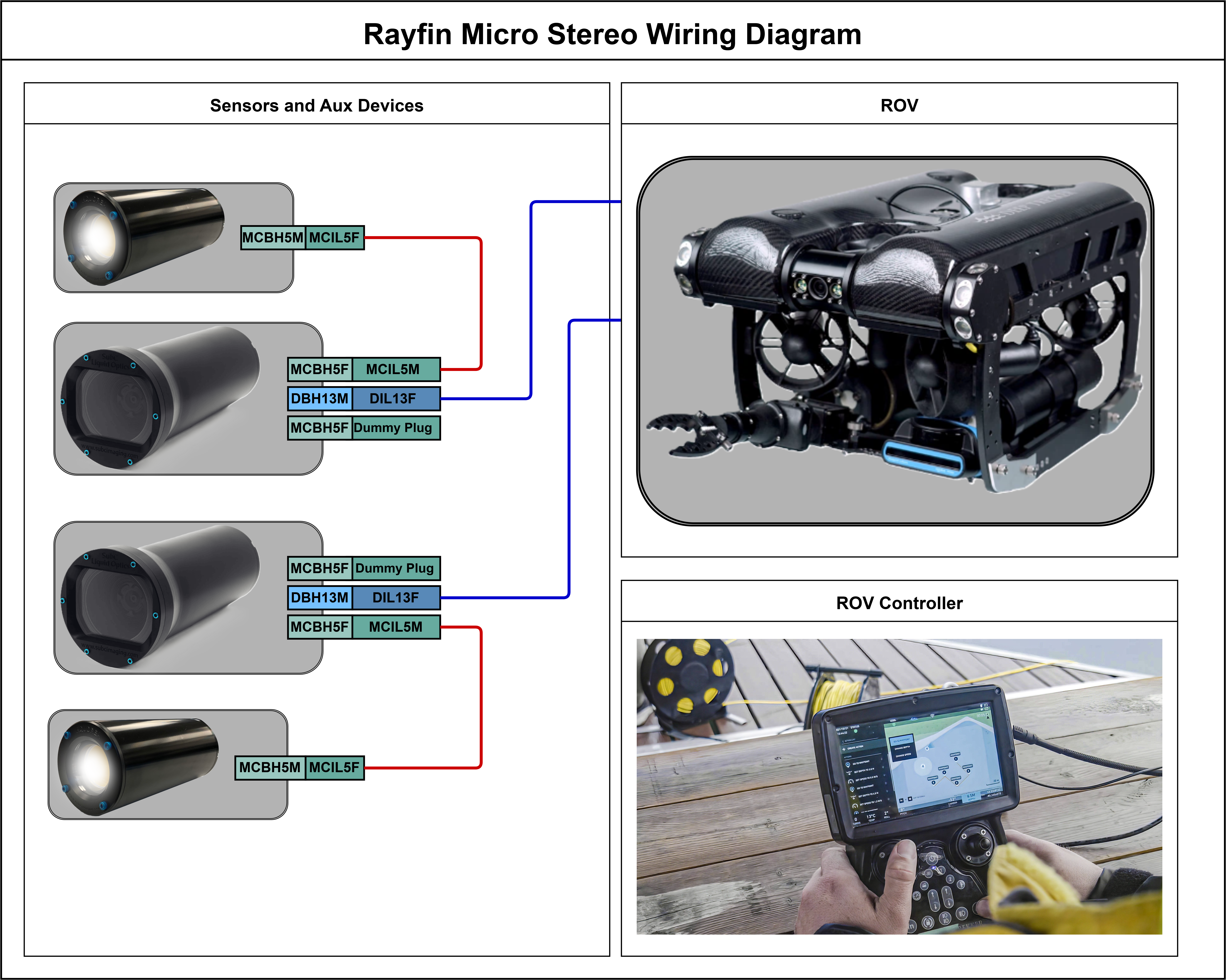
B. Connector Pinouts:
|
# |
DBH13M (Alu) + DLSA-M [IP video, control and data] |
MCBH5F (Alu) [AUX0 Port] |
MCBH5F (Alu) [AUX1 Port] |
|
1 |
GND |
GND |
GND |
|
2 |
Iso GND (Shield) (NC on system end) |
PWR |
PWR |
|
3 |
PWR |
AUX0 Out |
AUX1 Out |
|
4 |
(Brown) DD- [GigE] |
AUX0 RS-485 B(+) |
AUX1 RS-485 B(+) |
|
5 |
(White/Brown) DD+ [GigE] |
AUX0 RS-485 A(-) |
AUX1 RS-485 A(-) |
|
6 |
(Blue) DC+ [GigE] |
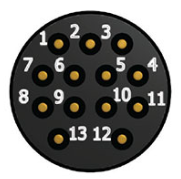
|
|
|
7 |
(White/Blue) DC- [GigE] |
||
|
8 |
(Orange) DA- [10/100] |
||
|
9 |
(White/Orange) DA+ [10/100] |
||
|
10 |
(Green) DB- [10/100] |
||
|
11 |
(White/Green) DB+ [10/100] |
||
|
12 |
NC |
||
|
13 |
NC |