
|
|||||||
|---|---|---|---|---|---|---|---|
|
|||||||
There are two ways to connect with Ethernet:
|
|||||||
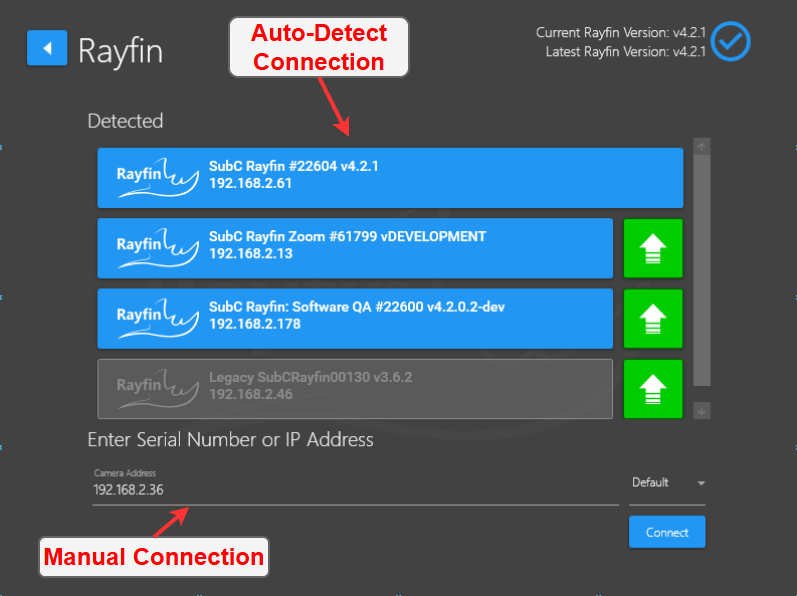
Auto Detection
|
Manual Connection
|
||||||
|
The camera should auto-detect and appear under Detected. |
You can manually enter the Serial Number ##### or IP address ###.###.###.### of the camera into the IP text box and press the Enter key or click Connect. |
||||||
|
Find your camera in the list. SubC Rayfin #XXXXX and click ( XXXXX being the serial number of the camera). |
|||||||
|
The software polls every 10 seconds to find cameras |
|||||||
Notes
|
|---|
|
DVR-O 7 SCI can find cameras on your network using the Network Service Discovery (NSD) protocol. |
|
If using a static IP, use the manual connection method |
|
Some firewalls may need certain ports unblocked to enable all functions |
|
If the camera is returning a loopback (127.0.0.1), then make sure the camera is connected to a DHCP host (router) |