
SubC Software is able to auto detect and list Rayfin cameras that you have connected to your LAN.
If Rayfin auto detect is not working, check the following:
System connected to multiple networks
Rayfin auto detection failing may be caused by having the SubC Software host system connected to multiple networks.
-
Example: If you are using Wi-Fi for an Internet connection and a router for the Rayfin camera.
In such a scenario, to get the SubC Software to auto detect the Rayfin camera, disconnect the PC from the router, restart the PC and start the SubC Software again.
Check Firewall Rules - Unblock ONVIF Protocol
Rayfin cameras Auto Detection uses ONVIF Protocol
-
Confirm with your IT Network Team to ensure your LAN firewalls are not blocking ONVIF.
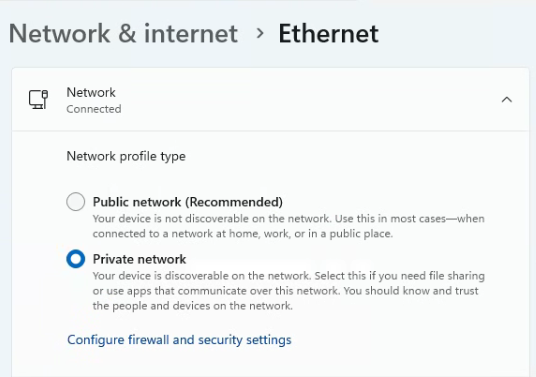
Set Ethernet to Private Network
-
Ensure that your SubC Software host system has Network & Internet → Ethernet set to Private network
Check Default Gateway
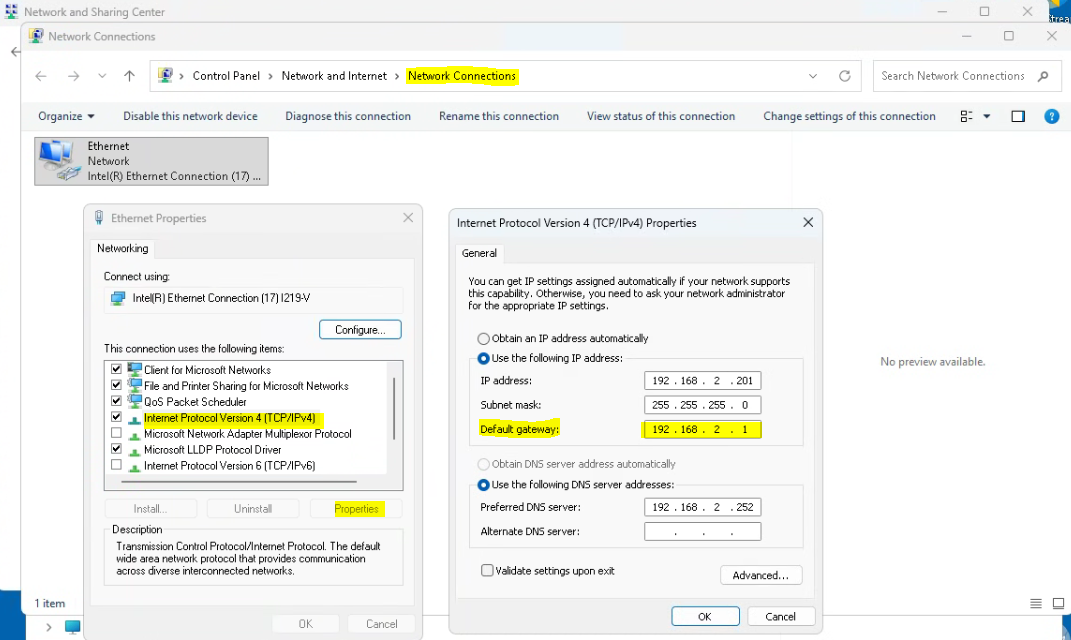
Check to ensure your systems Default Gateway is set correctly for your LAN.
Example:
If your SubC Software is still unable to auto detect your Rayfin cameras, please contact SubC Support Team. See Getting SubC Support