
Winch Deployment Operation
-
On the winch control panel:
-
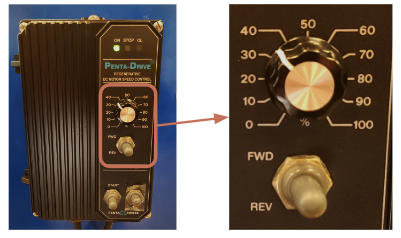
Flip the power switch upward, then move the adjacent switch to the START position to turn on the winch.
-
Turn the dial to adjust the winch's reeling speed. Counterclockwise increases the speed, and Clockwise lowers the speed. Once the frame is in the water and lines are clear, you can set the deployment speed to 100%.
-
Please follow Safety Instructions for safe winch operation
NOTE: Depending on the kind of vessel and type of deployment equipment, you may want to have the vessel moving before deploying the equipment, or after it is already in the water. This is specific to the situation and should be determined based on what must be done to keep things clear of the propellers and to meet any applicable safety regulations.
READ WINCH MANUAL BEFORE OPERATING. Refer to Winch Safety Page Before Operating
DCS Deployment Operation
-
Once the DCS is in the water, turn on the BPC unit to ensure the unit is fully operational before continuing.
-
Ensure the Rayfin shows up on RCS after about 30 seconds.
-
Ensure that there are no issues with the following items when the TCS is descending down in the water column.
-
No drop in live video stream
-
LEDs strobe when taking a picture with strobe ENABLED
-
Laser(s) is still ON and can be toggled ON/OFF
-
Altimeter reading shows on RCS
-
Take a digital still and review photo to verify picture quality
-
Do a short recording to verify the camera function
-
-
Monitor the altimeter reading on the RCS display. SubC’s recommendation is to stop the system at around 4 - 5 meters from the sea floor before moving to the next step.