
Directory:
-
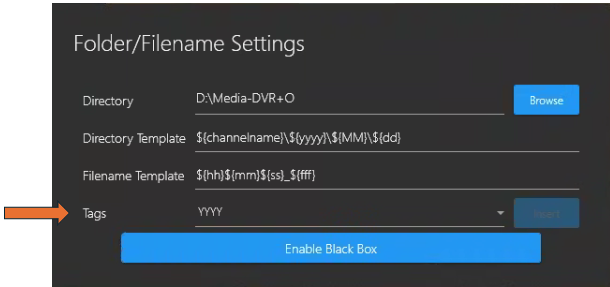
Directory: Browse to and select a directory where you wish to store your recording and still image files.
-
Directory Template: Default is ${channelname}\${yyyy}\${MM}\${dd} however, you can modify this directory template as you wish.
-
Filename Template: Default is ${hh}${mm}${ss}_${fff} however, you can modify this filename template as you wish.
-
Tags: A new ${type} tag allows users to have better control over their directory structure to keep like files together. This can speed up post-processing time to get results more quickly.
You can add/append tags (such as channel name, Year\Month\Day &/or Hour\Minute\Second\Milliseconds) by placing the cursor anywhere you want the tag to appear on the Directory or Filename template paths, then select the desired tag from the Tags field drop-down list. -
Enable Black Box - Click this button to open a Windows file explore and select a folder in which to store Black Box recording files.
-
Open the File/Folder Settings again to adjust your Black Box-Folder Limit using the slider button.
-
Note: The Folder Limit - The Day(s) / Hour(s) values are an estimation and will change depending on how many GBs you allocate to the BlackBox folder Limit.
Example: Limit: 100.0 GB Black box recordings will not be overwritten until after at least 1 Day(s) 13 Hour(s) of recording.
-
Selecting Microphone
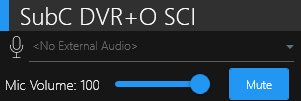
Select a Microphone before configuring any Channels if you wish to Embed Audio &/or Save audio as a separate file.
Recording Settings:
-
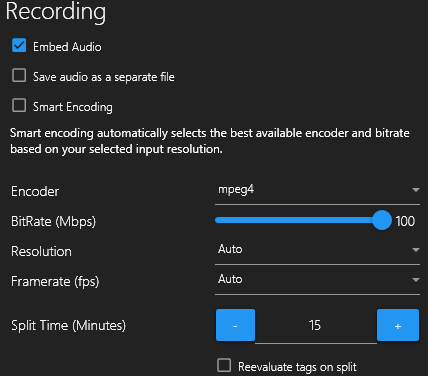
Embed Audio: Embeds any audio from the microphone input into the recorded video.
-
Save Audio as a separate file: Select the “Save the audio as a separate file” option if you prefer to have your audio and video files separate.
-
Smart Encoding: Automatically selects the best available encoder and bitrate based on your selected input resolution and the system’s capabilities.
-
Encoder: Choose the type of compression applied to the videos. H.265 (HEVC) is recommended(*see note). For more information,
-
Resolution:
-
Auto
-
3840x2160
-
1920x1080
-
1280x720
-
720x480
-
-
Framerate (fps):
-
Auto
-
30
-
20
-
15
-
5
-
-
Split Time (Minutes): Set the amount of time before a recorded video file splits
-
Reevaluate tags on split: When selected, will modify the filename of recorded video files each time they split according to the tags in the Filename Template.
Note:If the system is not using a GPU, mpeg4 may be the only option for the encoder
Note: SubC suggests using a unique directory name and file name for each location or transect along with a Year-Date-Month tag to be easily distinguished.
Directory: 
Selecting Microphone:
Recording Settings: 
|
Quality |
Resolution |
Bitrate (Mbps) |
|
SD |
720 x 480 |
5 |
|
HD |
1920 x 1080 |
25 |
|
4K |
3840 x 2160 |
100 |