
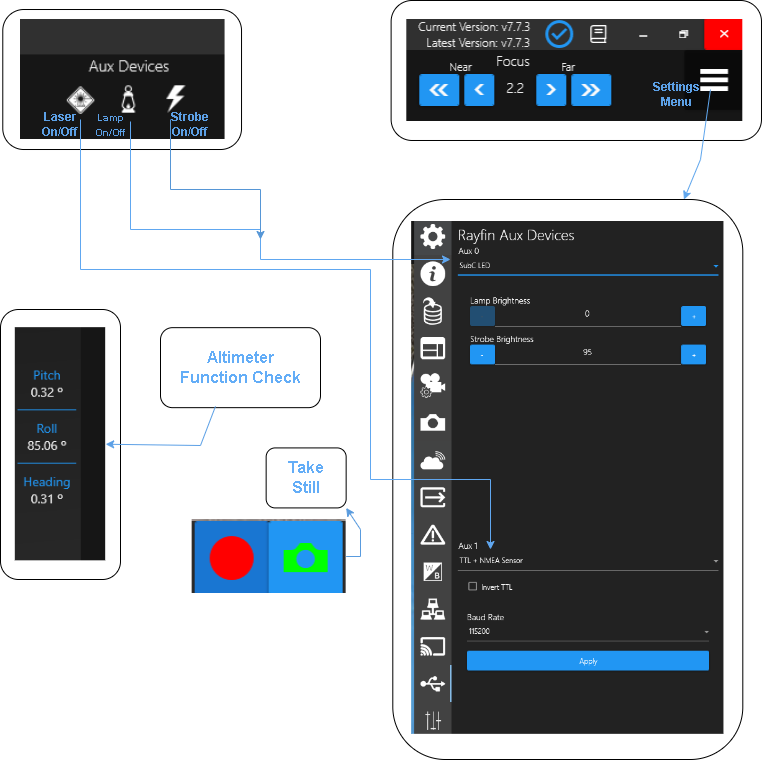
NOTE: Please DO NOT operate the Rayfin and LEDs in air for a prolonged period
Open Rayfin Control Software.
LED Function Check
-
Click the Lantern icon to turn the lamp on/off (100%/0% brightness)

-
Open the “Settings Menu” and navigate to Aux Devices.

-
Test various brightness levels to verify that they are working as intended.
-
To enable strobing on the LED, click the Lighting Bolt icon.

-
Press the camera button to take photos.
-
Verify that both LEDs flash
IMPORTANT! For laser safety, ensure no personnel are in front of the DCS. For more information, please refer to Laser Precautions on properly handling laser devices.
Laser Function Check
-
Press the laser Icon to toggle the Laser On/Off.

-
If the Laser function is reversed, do the following:
-
Open the “Settings Menu” and navigate to Aux Devices.
-
Click the Invert TTL check box.
-
Press the laser Icon to toggle the Laser On/Off.
-
Altimeter Function Check
-
Place the altimeter in a bucket of water.
-
Ensure the altimeter reading is displaying on the DVR-O screen. (should show below heading)
Note: Please ignore the inaccuracy in altimeter reading in the bucket of water as the altimeter won’t provide accurate readings due to reflections in such a confined space.