Directory:
-
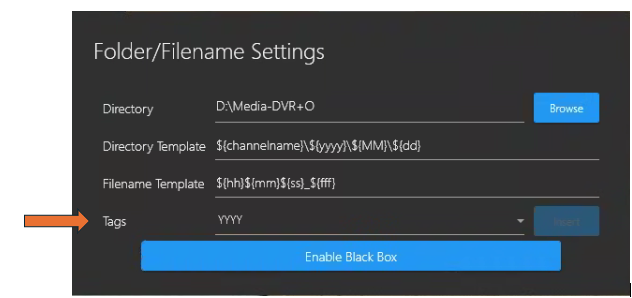
Directory: Browse to and select a directory where you wish to store your recording and still image files.
-
Directory Template: Default is ${channelname}\${yyyy}\${MM}\${dd} however, you can modify this directory template as you wish.
-
Filename Template: Default is ${hh}${mm}${ss}_${fff} however, you can modify this filename template as you wish.
-
Tags: A new ${type} tag allows users to have better control over their directory structure to keep like files together. This can speed up post-processing time to get results more quickly.
You can add/append tags (such as channel name, Year\Month\Day &/or Hour\Minute\Second\Milliseconds) by placing the cursor anywhere you want the tag to appear on the Directory or Filename template paths, then select the desired tag from the Tags field drop-down list. -
Enable Black Box - Click this button to open a Windows file explore and select a folder in which to store Black Box recording files.
-
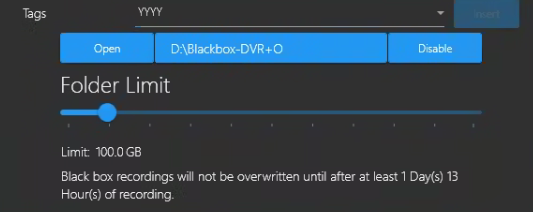
Open the File/Folder Settings again to adjust your Black Box-Folder Limit using the slider button.
-
Note: The Folder Limit - The Day(s) / Hour(s) values are an estimation and will change depending on how many GBs you allocate to the BlackBox folder Limit.
Example: Limit: 100.0 GB Black box recordings will not be overwritten until after at least 1 Day(s) 13 Hour(s) of recording.
-
Digital Stills
-
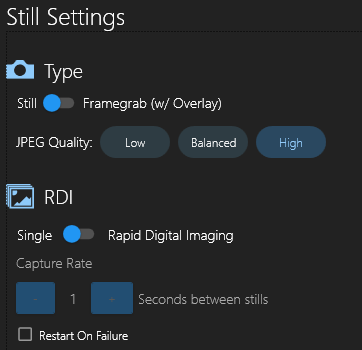
Type: This is a toggle between a digital still & frame grab
-
Digital Still - Higher overall quality as it is a digital still taken with the sensor. No overlays are present in the still. Includes Exif Data on each still.
-
Framegrab - This is a framegrab of the live stream of the camera. It includes any overlays that are active on the stream.
-
-
JPEG Quality: If set to Jpeg, adjust the quality to change the compression. An image at 100% quality has (almost) no loss, and 1% quality is very compressed. SubC suggests to set the compression rate to 95%.
-
Tags: This can be applied to the Name and Directory, depending on which field the cursor is in.
RDI Settings
-
When RDI is on and you click the Camera with RDI button, Stills will be continuously taken until you stop by clicking the Camera with RDI button again.
-
Capture Rate: Time between stills.
-
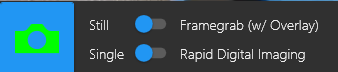
Take Still / Framegrab - With RDI - Rapid Digital Imaging turned on. Click the Camera icon button to take a Still image or Framegrab (while video recording) of the current Channel video.

Note: SubC suggests using a unique directory name and file name for each location or transect along with a Year-Date-Month tag to be easily distinguished.
Directory: 
Blackbox Settings: 
Stills Settings: