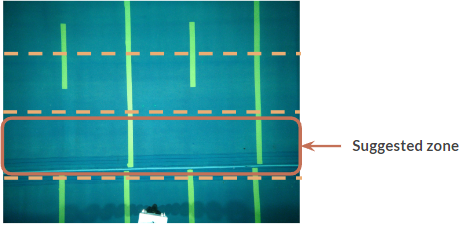
Angled Rayfin
-
Take several digital stills.
-
When previewing the images, divide the image into 4 zones as shown on the right. Use the laser dots as the point of reference for which zone to select.
-
Pick an object inside that zone and adjust the focus until it’s deemed to provide the sharpest image.
-
Take a digital still with that setting.
-
Preview the image to determine if it is sharp and in focus.
-
You might need to zoom in on the image to determine the sharpness. If the image is not sharp enough, repeat the process until an acceptable result is obtained.
Note: This is an iterative process so it might take a couple of tries to achieve the optimum focus settings.
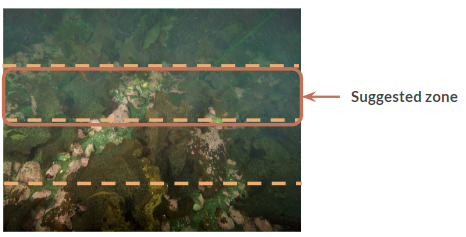
Vertical Rayfin
-
Take several digital stills
-
When previewing the images, divide the image into 4 zones as shown on the right. Use the center of the frame, or your projected laser points (if equipped), as the primary point of reference for which zone to select.
-
Pick an object inside that zone and adjust the focus until it’s deemed to provide the sharpest image.
-
Take a digital still with that setting.
-
Preview the image to determine if it is sharp and in focus.
-
You might need to zoom in on the image to determine the sharpness. If the image is not sharp enough, repeat the process until an acceptable result is obtained.
Note: This is an iterative process so it might take a couple of tries to achieve the optimum focus settings.